Search here

Minggu, 20 Desember 2009

TuneUp Utilities 2010 9.0.3000.52


TuneUp Utilities 2010 can quickly make your Windows operating system faster, easier to use, and more secure. And all operations performed on the operating system are completely safe, because all changes are monitored by TuneUp Rescue Center and can be undone at any time. All TuneUp Utilities modules can be accessed through a common interface that is divided into six categories. In addition, the main window also has three general buttons in a dark gray bar to the right at the top of the window. Pressing the first button starts the TuneUp Rescue Center module. The second button starts the TuneUp Update Wizard, which can be used to update TuneUp Utilities 2009 to the latest version over the Internet. The last button provides help and settings that you can use to customize the software package to meet your needs.

The new Start page
TuneUp Utilities 2010 welcomes you with a completely redesigned Start page, which tells you about the status of your computer. If problems or nonoptimal settings are found, you are only a mouse-click away from resolving them. The Start page also tells you when new tips for increasing computer performance are available and warns you if maintenance tasks are not being taken care of automatically. The Start page also shows you whether new automatic startup programs have been added to Windows since the last time you ran TuneUp Utilities. You can decide whether these programs that start up automatically are really necessary.

TuneUp Speed Optimizer
Which settings slow your computer down? Which unnecessary services or programs are running in the background? Is your Internet connection optimally configured? TuneUp Speed Optimizer knows the answers to all these questions. It examines your entire system for bottlenecks, superfluous background programs, and incorrect settings. Great: with just one click you can carry out most optimizations very quickly. In addition, TuneUp Speed Optimizer provides suggestions for speeding up your system.

TuneUp Shortcut Cleaner
Cleaning up your working environment is tedious: removing invalid shortcuts from the Start menu, the Desktop, and the Quick Launch bar is very time-consuming. TuneUp ShortCut Cleaner now does the work for you. It checks whether all shortcuts are valid and removes the orphaned ones with just a click of a button. At the same time, empty folders are removed from the Start menu. TuneUp ShortCut Cleaner also checks frequently used programs and cleans up the list of recently opened files.

Support for the Opera browser
After hard disk defragmentation, which we introduced in TuneUp Utilities 2009, the feature most requested by customers was support for the Opera browser. TuneUp Utilities 2010 now also includes full support for Opera. Via several special Opera settings, TuneUp System Control now allows you to change the number of Speed Dial entries, conveniently choose your default search engine, and reenable fast backward and forward navigation. Internet optimization lets you optimize Opera's performance for your Internet connection. Free up disk space lets you delete the Opera cache.

TuneUp Styler
Now you can also change the Vista logo animation which appears just before logon. You can download a whole series of great animations from the TuneUp website. Or, if you prefer, you can choose your own personal image to display while Vista starts up. With Vista, you can also add your own images to Vista's logon screen: With just a few mouse clicks you can create a truly personal logon experience.

TuneUp Uninstall Manager
Redesigned from the ground up, TuneUp Install Manager now runs much faster and has a new, even more intuitive interface so that it is even easier to uninstall unnecessary programs. Unnecessary programs often are forgotten because they were installed a long time ago and then not used. TuneUp Utilities 2009 shows you a list of programs not used for a long time so that you can target for uninstallation those applications that use valuable disk space and in certain circumstances even slow your system down.

TuneUp StartUp Manager
A smooth-running system results when there are no unnecessary autostart applications. The improved TuneUp Startup Manager organizes your programs into groups and provides clear explanations to make it easier for you to identify those programs that are not needed.New automatic startup programs are now highlighted so that you can disable unwanted entries more easily. System start tasks are now also listed in TuneUp StartUp Manager In Vista, in particular, scheduled tasks are used in place of autostart entries.

Free up disk space
The already rapid display of disk space to be freed up is now even faster on NTFS drives. And now it is so easy to delete even more unnecessary files, like the backup files for the first Windows Vista service pack and the Opera and Safari caches. The second "Free up disk space" module that helps you turn off Windows functions that use excessive disk space has also been enhanced. The Windows Search index can now be disabled and deleted with a single click. This makes particular sense if you are already using a different search engine. In addition, TuneUp Disk Space Explorer now runs faster and no longer requires that an entire drive be analyzed. You can now specify that only those folders be analyzed that you are really interested in.

Lots more improvements
Along with the totally new features, there are a series of improvements that are not immediately visible. There are small improvements like Tooltips in the main window, a substantial increase in the number of problems that can be found byTuneUp Registry Cleaner, and better progress feedback from TuneUp Drive Defrag. But there are also big improvements "under the hood". Two good examples are a completely reworked installation program and significant improvements in our update technology.

Size : 20 MB

Download : Mediafire

sumber: http://www.kaskus.us/showthread.php?t=2959013


AVG Internet Security 9.0 Full Version

 
AVG Internet Security akan memberikan perlindungan yang aman untuk anda ketika menjelajahi, menelusuri, mengunduh, bertransaksi perbankan, dan berbelanja online dengan aman. Dan melindungi komputer anda dari serangan-serangan seperti virus, spyware, adware dan trojan
Dengan AVG Internet Security,  Anda senantiasa mendapatkan pengalaman online secara aman. Dengan beberapa lapis perlindungan dari Internet Security, Anda tidak perlu cemas dengan pencurian identitas, spam, atau virus. Dan ini bahkan mencegah Anda secara tidak sengaja mengunjungi situs berbahaya.


Keamanan yang lebih cepat dan lebih cerdas ini tidak akan memperlambat komputer Anda

  • Bertransaksi perbankan dan berbelanja online dengan aman tanpa takut akan pencurian identitas berkat teknologi Perlindungan Identitas baru dari AVG
  • Menjelajahi dan menelusuri dengan rasa yakin, dengan LinkScanner® memeriksa halaman web di saat yang paling menentukan - tepat sebelum Anda mengklik tautan itu
  • Bertukar foto dan file lainnya dengan teman melalui IM dan jaringan sosial, aman dari risiko infeksi virus yang tak disengaja
  • Mengunduh musik dan aplikasi dengan aman
  • Menjaga kotak masuk Anda tetap bersih dari phisher, scammer, dan spammer sehingga Anda dapat fokus pada penggunaan email agar tetap terhubung dengan teman dan keluarga
  • Nikmati performa pemindaian berkecepatan tinggi yang konsisten dengan pemindai virus modern yang BARU dari kami
AVG Internet Security Features :

  • Anti-Virus & Anti-Spyware : Perlindungan terhadap virus, spyware, adware dan trojan
  • LinkScanner Search-Shield : Peringkat keselamatan waktu nyata untuk semua hasil penelusuran Google, Yahoo dan MSN/Live search
  • LinkScanner Active Surf-Shield : Melindungi dari laman web yang terinfeksi secara waktu-nyata saat Anda menjelajah web
  • Web Shield : Menyaring unduhan Anda dan mencegah infeksi tanpa sengaja melalui obrolan IM
  • Anti-Rootkit : Perlindungan terhadap ancaman tersembunyi yang mengantarkan konten jahat/merusak
  • Dukungan Gratis : Dukungan dan layanan gratis sepanjang waktu dan di seluruh dunia
  • Firewall : Menghentikan peretas (hacker) dan penyebaran virus di internet
  • Anti-Spam : Menangkap ancaman e-mail termasuk pencurian identitas (phishing), penipuan dan spam
PETUNJUK INSTALL :
Jangan lupa untuk remove Program Anti Virus lainnya sebelum memulai installasi Anti Virus AVG

  • Download file setup AVG Anti Virus
  • Lakukan Installasi
  • Ketika proses instal sedang berlangsung dan muncul menu “Activate Your AVG License” , masukkan data dan serial yang terdapat dibawah postingan ini

  • Lanjutkan Proses installasi sampai dengan selesai
  • Finished
Jangan lupa setelah selesai untuk segera update Anti Virus AVG, untuk lebih jelas tentang Update Anti Virus AVG baca postingan saya sebelumnya : Tips Update Anti Virus AVG

AVG Internet Security 9 dari situs resminya dihargai sebesar US $54.99 untuk setahun. Di situs ini anda bisa mendapatkannya secara gratis, bahkan data dan serial yang bisa anda download dari d60pc website  valid sampai 26 Februari 2018 (9 tahun lebih).
AVG Internet Security 9.0 is compatible with : Windows 2000, Windows XP, Windows Vista, Windows 7


License Number :
8MEH-RXYFD-JUV72-8922R-FTBZ6-QEMBR-ACED
8MEH-RAJC2-O3P77-KRRQA-H3SLN-REMBR-ACED
8MEH-RXYFD-JUV72-8922R-FTBZ6-QEMBR-ACED
8MEH-R2CML-SS7FW-MOXFR-TRU8V-3EMBR-ACED
8MEH-RS47Y-82HT8-GONVA-BCCCZ-DEMBR-ACED
8MEH-RXYFD-JUV72-8922R-FTDO8-QEMBR-ACED
8MEH-RF7RF-MR8JO-EWOVA-UVKMQ-FEMBR-ACED

Download : AVG Internet Security 9.0
Download : From Indowebster


sumber: Klik


Minggu, 25 Oktober 2009

Office All in One Package (java phone)


Including:
- Ms. Word
- Ms. Excel
- Mobile Maths
- Periodic Table
- Mobile PDF

Download here:
Mediafire


Sabtu, 26 September 2009

Norton antivirus & Norton internet security 2010


Norton Antivirus 2010

Norton AntiVirus 2010 will be the fastest and lightest malware scanner Symantec has ever delivered. The Norton AntiVirus application scans faster and uses less memory than any other antivirus product on the market. Unlike free solutions from Microsoft, Norton AntiVirus includes intrusion detection to detect malicious code hidden in web sites before it can strike.

And Norton AntiVirus’s pulse updates ensure that you are always plugged into Symantec’s global security grid and you are never more than a few minutes away from the latest update. Improved Norton Safe Web technology blocks Internet threats before they can infect your PC. So you can browse, buy and bank online with confidence. Plus, unlike other antivirus products, Norton AntiVirus 2010 provides easy-to-understand threat and performance information to help you avoid future threats and keep your PC running


Key Benefits
Stops viruses, worms, spyware, bots, and more—Keeps your system protected against all types of malicious threats.
Norton Insight—Delivers innovative intelligence-driven technology for faster, fewer, shorter scans.
Rapid pulse updates every 5 to 15 minutes—provides up-to-the-minute protection.
Prevents virus-infected emails and instant messages from spreading—Feel secure while you keep in touch.
Blocks browser exploits and protects against infected Web sites

Here are some key features of "Norton AntiVirus":

Engineered for Speed:
· Scans only files and processes at risk using Norton Insight.
· NEW! Installs in under one minute on average, requires less than 8 MB of memory


Up-to-the-minute Protection:
· Delivers up-to-the-minute protection with rapid pulse updates every 5 to 15 minutes.
· IMPROVED! Provides multilayered security through the Norton Protection System.
· Prevents bots from taking control of your PC.
· Detects and automatically removes malicious threats.
· IMPROVED! Defends against Web-based attacks.
· Automatically detects and removes spyware, viruses, Trojans, bots and Internet worms.
· Recovery tool boots and repairs badly infected PCs. Delivers our most complete, deep cleaning scan possible.
· Norton Ongoing Protection provides continuous protection updates and new product features as they become available throughout your product subscription period, helping to keep your computer protected against the latest Internet threats and risks.
· Norton Automatic Renewal Service helps to ensure that you’re protected by automatically renewing your product subscription before it expires.


Control without disruptions:
· Automatically schedules scans and updates to occur while PC is idle.
· Review the security status of every process on your PC.
· Silent mode helps ensures movies and games are never interrupted.
· Maps your wireless home network.


Download Here
link


Norton Internet Security 2010

Norton Internet Security was designed to be the fastest virus, spyware and internet protection you can buy. The Norton Internet Security main window acts as a security management interface.

Norton Internet Security 2010 will be the fastest and lightest security suite Symantec has ever delivered. It guards your PC, network, online activities and your identity with innovative, intelligent detection technologies optimized to combat today’s aggressive, rapid-fire attacks. Improved Norton Safe Web technology blocks Internet threats before they can infect your PC.


So you can browse, buy and bank online with confidence. It even warns you of unsafe web sites right in your search results. Plus, unlike other Internet security suites, it provides easy-to-understand threat and performance information to help you avoid future threats and keep your PC running fast.


Here are some key features of "Norton Internet Security":


Engineered for Speed:
· Proven fastest and lightest security suite available
· Intelligence-driven Norton Insight technology targets only those files at risk for faster, fewer, shorter scans
· Installs in under one minute on average requires less than 7 MB of memory
· Up-to-the-minute Protection
· Delivers up-to-the-minute protection with rapid pulse updates every 5 to 15 minutes.
· The Norton Protection System provides multilayered protection technologies that work in concert to stop threats before they impact you.
· Real-time SONAR (Symantec Online Network for Advanced Response) helps prevent bots from taking control of your PC.
· Prevents threats from entering through your firewall.
· Detects and automatically removes online threats.
· Defends against Web-based attacks with patent-pending technology.
· Recovery Tool boots and repairs badly infected PCs
· Delivers our most complete deep-cleaning scan possible.
· Prevents bots from taking control of your PC.
· Norton Ongoing Protection provides continuous protection updates and new product features as they become available throughout your product subscription period, helping to keep your computer protected against the latest Internet threats and risks.
· Norton Automatic Renewal Service helps to ensure that you’re protected by automatically renewing your product subscription before it expires.

Norton Identity Safe:
· Keeps your online identity safer than ever when you buy, bank, browse, and game online.
· Advanced phishing protection keeps your personal identification out of the hands of fraudulent Web sites.
· Stores and encrypts your passwords and other confidential data.
· Fills in online forms at your request to save time and protect you from keystroke loggers.

Control without disruptions:
· Puts every element of your security at your fingertips
· NEW! Schedules resource intensive tasks for when you’re not using your PC.
· Review the security status of every process on your PC.
· Silent mode suspends alerts and updates to avoid interrupting or slowing games and movies.
· Smart two-way firewall automatically makes security decisions for you.

Secure Networking:
· Helps you secure your home network.
· Conceals and secures your PC on public Wi-Fi networks.

Parental Controls:
· Create individual user profiles with enhanced parental controls.

Spam Blocking:
· Filters spam better than ever.


Download here
 link


Norton TrialReset 2010 v1.5.0 by BOX!

General info:
*************

Norton TrialReset 2010 v1.5.0 extends the trial period of Norton 2010 so there's more time to evaluate the product (362 days).

Norton TrialReset 2010 v1.5.0 is for:

- Norton AntiVirus 2010 v17.0.0.136
- Norton Internet Security 2010 v17.0.0.136
- Norton 360 v3.5.2.11 Standard/Premier Edition

* Tested on WinXP (x86), Vista (x86/x64), Win7 (x86/x64).
* May not work with the latest patches/updates.


<--------------------------------------------------------------------------------->

NOTE:
*****

Norton TrialReset 2010 v1.4BE works but some users reported a problem
with the Norton account poppin up every time.


Norton TrialReset 2010 v1.5.0 resets Norton to 362 days and no pop ups
of the Norton account.

Download here
link


Sabtu, 14 Maret 2009

Internet Download Manager


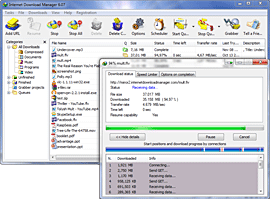
Internet Download Manager (IDM) is a tool to increase download speeds by up to 5 times, resume and schedule downloads. Comprehensive error recovery and resume capability will restart broken or interrupted downloads due to lost connections, network problems, computer shutdowns, or unexpected power outages. Simple graphic user interface makes IDM user friendly and easy to use.Internet Download Manager has a smart download logic accelerator that features intelligent dynamic file segmentation and safe multipart downloading technology to accelerate your downloads. Unlike other download managers and accelerators Internet Download Manager segments downloaded files dynamically during download process and reuses available connections without additional connect and login stages to achieve best acceleration performance.

Internet Download Manager supports proxy servers, ftp and http protocols, firewalls, redirects, cookies, authorization, MP3 audio and MPEG video content processing. IDM integrates seamlessly into Microsoft Internet Explorer, Netscape, MSN Explorer, AOL, Opera, Mozilla, Mozilla Firefox, Mozilla Firebird, Avant Browser, MyIE2, and all other popular browsers to automatically handle your downloads. You can also drag and drop files, or use Internet Download Manager from command line. Internet Download Manager can dial your modem at the set time, download the files you want, then hang up or even shut down your computer when it's done.

Other features include multilingual support, zip preview, download categories, scheduler pro, sounds on different events, HTTPS support, queue processor, html help and tutorial, enhanced virus protection on download completion, progressive downloading with quotas (useful for connections that use some kind of fair access policy or FAP like Direcway, Direct PC, Hughes, etc.), built-in download accelerator, and many others.

Version 5.15 adds IDM download panel for web-players that can be used to download flash videos from sites like YouTube, MySpaceTV, and Google Videos. It also features complete Vista support, YouTube grabber, redeveloped scheduler, and MMS protocol support. The new version also adds improved integration for IE and IE based browsers, redesigned and enhanced download engine, the unique advanced integration into all latest browsers, improved toolbar, and a wealth of other improvements and new features.


Download Here